Damco WorkbenchDamco Workbench

Agents do the work. Your people make the calls.

Damco Workbench is the workbench for AI agents and humans, built for insurance. Agents take on quotes, policy changes, and claims, and your underwriters, adjusters, and service reps approve what matters. Every change is saved to your policy system.

See it run your processFind your processes →
Runs in your cloud or your data centerConnects to the policy, billing, and claims systems you runYour models, your data, your rules
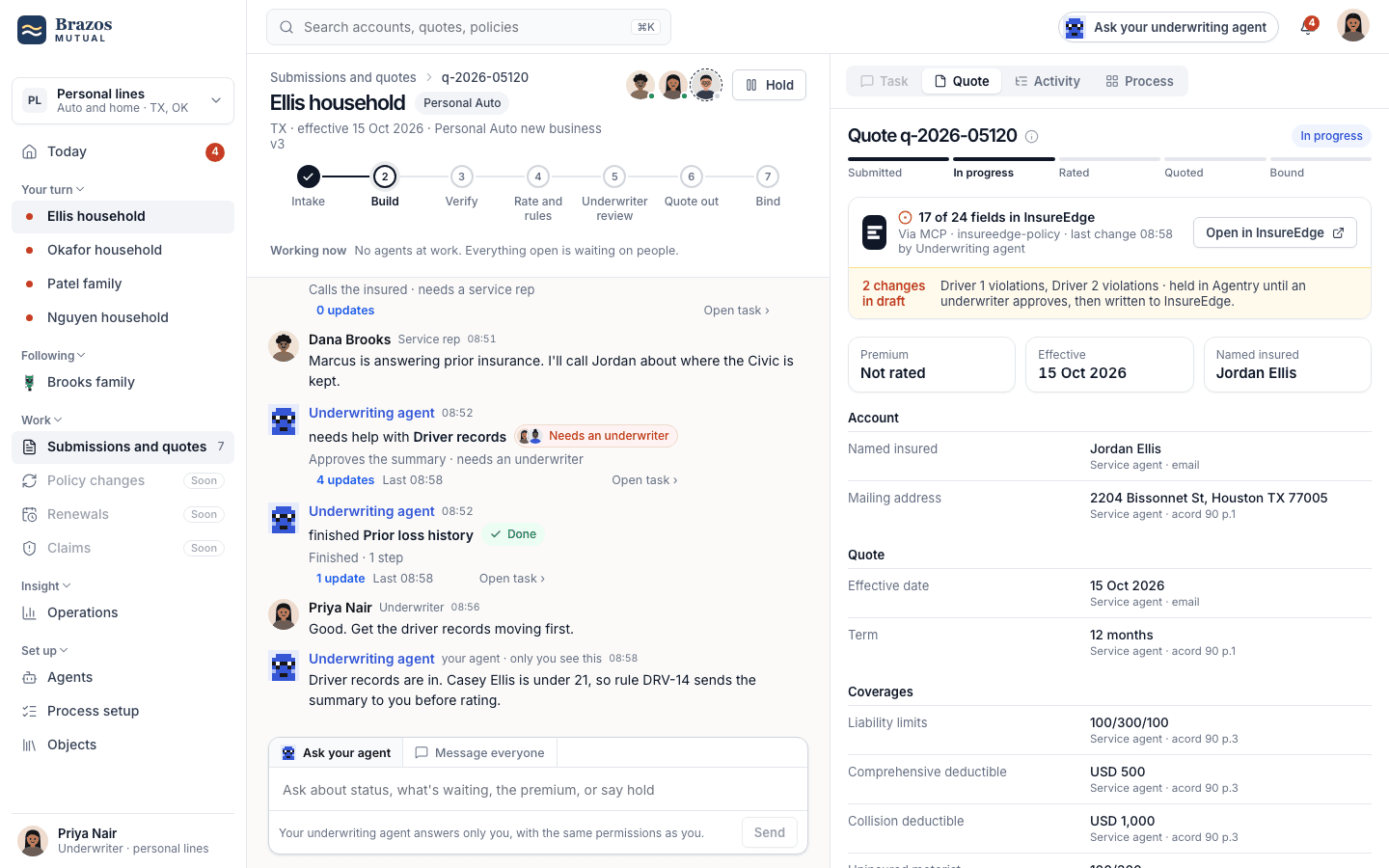
agents.brazosmutual.com/quotes/Q-2026-04471
A Damco Workbench quote: the conversation with agents and people, and the Quote tab synced with InsureEdge
Underwriting agentSummarized 2 driver records2 drafts heldNeeds an underwriter
Quote in InsureEdgeLive
18 of 22 fields saved to InsureEdge
Young-driver guidelines v7DRV-14 · under 21Refer

AI can do insurance work, but your operation has nowhere to put it

Agents can already read a submission or summarize a loss run. What's missing is the place they work: beside the right people, on the real record, inside the rules.

01

Agents have nowhere to work

The pilot answers questions in a chat tab. Nobody else can see what it did, the underwriter re-keys its answer into the core, and the audit trail is a screenshot.

02

Automation can't hold judgment

Workflow tools move data between steps. Insurance work refers, waits for authority, asks the right person and has to explain itself to a regulator later.

03

Cores were never built for agents

The record lives in the core, behind screens made for people. Agents either get no access, or broad API keys nobody can govern tool by tool.

The same claim, before and after your agents join the room

Drag the handle to compare. Before, the claim is copied between tools and emailed as files. After, people and agents work on it together, and the core stays in step.

Drag to compare
After· one room for the claim
#claim-20417 · auto
Claims intake agent9:02

I opened the claim from the call. Two photos are still missing.

Rosa, adjuster9:05

@Adjusting agent is rental covered?

Adjusting agent9:05

Yes, 30 days. I drafted the reserve change for you.

Reserve 1,200 → 2,400Approve
Rosa approved. Written to the core.
Data agent is reading the photos
Message the room, or @ an agent
One room for the claimAgents work in the open, people approve, and the core stays in step.
Before· copied between tools
Your system of recordAn agent drafted a summaryExport PDFLast updated by hand, yesterday
Rosa keys the result back into the core, a day later.
InboxFwd: Fwd: claim summaryRe: Re: is rental covered?Re: the numbers, attached
Tracker, claims_oct_v320417Open1,20020417Open?2,400Rekeyed, and no longer matches
AssistantSummarise this PDF for me.I cannot see the policy or change the claim.
The claimAuto · 20417Five copies, and none is complete.
Copied between toolsThe claim is emailed around as files, and the core is updated by hand.

Agents get a workbench, not another chatbot or workflow builder

You define the agents on top. Your core stays underneath. Everything in between, the conversation, the process, the rules, the approvals and the audit, is Workbench.

Your agents and peopleDefined on top. Workbench ships role agents; you add your own.
Underwriting agentReferrals, MVRs, rating
Service agentIntake, changes, documents
Claims intake agentFirst notice, by email and web
Adjusting agentCoverage, reserves, payments
Agents you defineYour prompts, tools and limits, in the same workbench
OwnBring your own agentAgents you already run can join, with the same controls
Your peopleUnderwriters, reps, adjusters, producers
WorkbenchWhere the work happens and is governed.
Conversationpeople and agents on one piece of work
Processthe whole job, stage by stage
Tasksteps: automated, agent, human
Objectsquote, policy, claim, account
Rulesversioned, with decision traces
Approvalsdrafts held until someone signs
Activityevery tool call, on the record
OperationsKPIs for every process
ConnectorsHow Workbench reaches your systems, tool by tool.
MCPtools on each systemREST · GraphQLwhere there's no MCPEvents · webhookschanges pushed in real timeSFTP · batchbordereaux, legacyYour flowsn8n, Power Automate as tools
Your systems of recordStay where they are. Workbench reads and writes through them.
InsureEdgeDamco's modern policy system
GuidewirePolicyCenter, ClaimCenter
Duck CreekPolicy, billing
Your own coreIn-house, mainframe, AS/400
And the data around themDocumentsMotor vehicle recordsISO and VeriskRating enginesCRMEmail
Around every layer
Your modelsAzure OpenAI or Bedrock in your tenant, or models you host. Swap per agent.
Your identitySSO over SAML or OIDC, SCIM for people and roles.
Your auditEvery action exported to your SIEM and warehouse.

Workflow tools move data, and Workbench holds the work

They solve different problems and often sit side by side. The difference shows the moment a step needs judgment, authority or a regulator's question answered.

Workflow automation
n8n, Zapier, Power Automate
Chat assistants
copilots, general chatbots
Workbenchthe workbench for agents
The unit of workA flow of nodesA chat with one personA process run on an insurance object, split into tasks
Who does the workNodes, triggered by eventsOne person and one assistantPeople and agents together, each task in its role
JudgmentBranch conditionsWhatever the prompt allowsVersioned rules with a decision trace, referral to the right role
Changing the coreAPI calls with a shared keyUsually it can'tNamed tools with a policy each: read, write, needs approval, people only
AuditExecution logsChat historyEvery rule, tool call and approval on the record it touched
On n8n alreadyKeep it. n8n is good at moving data, and it can run in your data center too. Workbench calls your flows as tools, so a step can be "run the bordereau flow" with a rule before it and an approval after.

What's new is how agents work and what they work on

Two things are new: how people and agents share work, and the insurance objects they work on.

In Workbenchwhere the work happens
Co-working

Agents work alongside your team, not in a chat box

Every agent has a name, a role, and set permissions. Each person works with their own agents, and everyone can see where the work stands.

Underwriting reading 2 driver recordsService matching the account
Underwriting agent to Priya · 9:14Tyler is 19, so our young-driver guideline refers this to you. I've drafted his record, and nothing is saved until you approve.

Every automated decision can be explained

You can see which guideline applied, who owns it, what went in, and what came out. Your business owners use this to improve the guidelines.

Young-driver guidelines · v7Owner M. Alvarez
DRV-14Driver under 21 needs approvalRefer
DRV-03At-fault accidents in 3 yearsPass
DRV-09Major violations in 5 yearsPass

Changes wait as drafts until someone with authority approves

Agents prepare changes to the record. Anything that needs approval waits as a draft, then is saved through your policy system's own controls.

2 fields held as draftsnot yet in InsureEdge
Driver 2 violations1 speeding, 2025DraftWritten
Driver 2 licenseValid, TXDraftWritten
Approve and writeChange
In insurancethe objects your people already work on
Real time

Workbench understands quotes, policies, and claims

It knows the stages each one goes through, and keeps it in step with your policy or claims system. Agents change a record only the way that system allows, and changes your people make there show up in Workbench, so nobody retypes anything.

ObjectSystem of recordViaToolsStateSynced
QuoteInsureEdgeMCP15 toolsRated2 s ago
PolicyInsureEdgeMCP6 toolsIn force2 s ago
ClaimGuidewire ClaimCenterMCP23 toolsOpen5 s ago
AccountInsureEdgeMCP4 toolsActive2 s ago
SubmissionDocument storeAPI2 toolsReceived1 min ago
CertificateAgency systemAPI3 toolsIssuedon request

Referrals go to the person with authority

Each task goes to the role that can approve it, and you see the named people in that role, not an anonymous queue.

Needs an underwriter
Dana sees it, can't approve it
Approves up to $6,000 in premium · above that, M. Alvarez

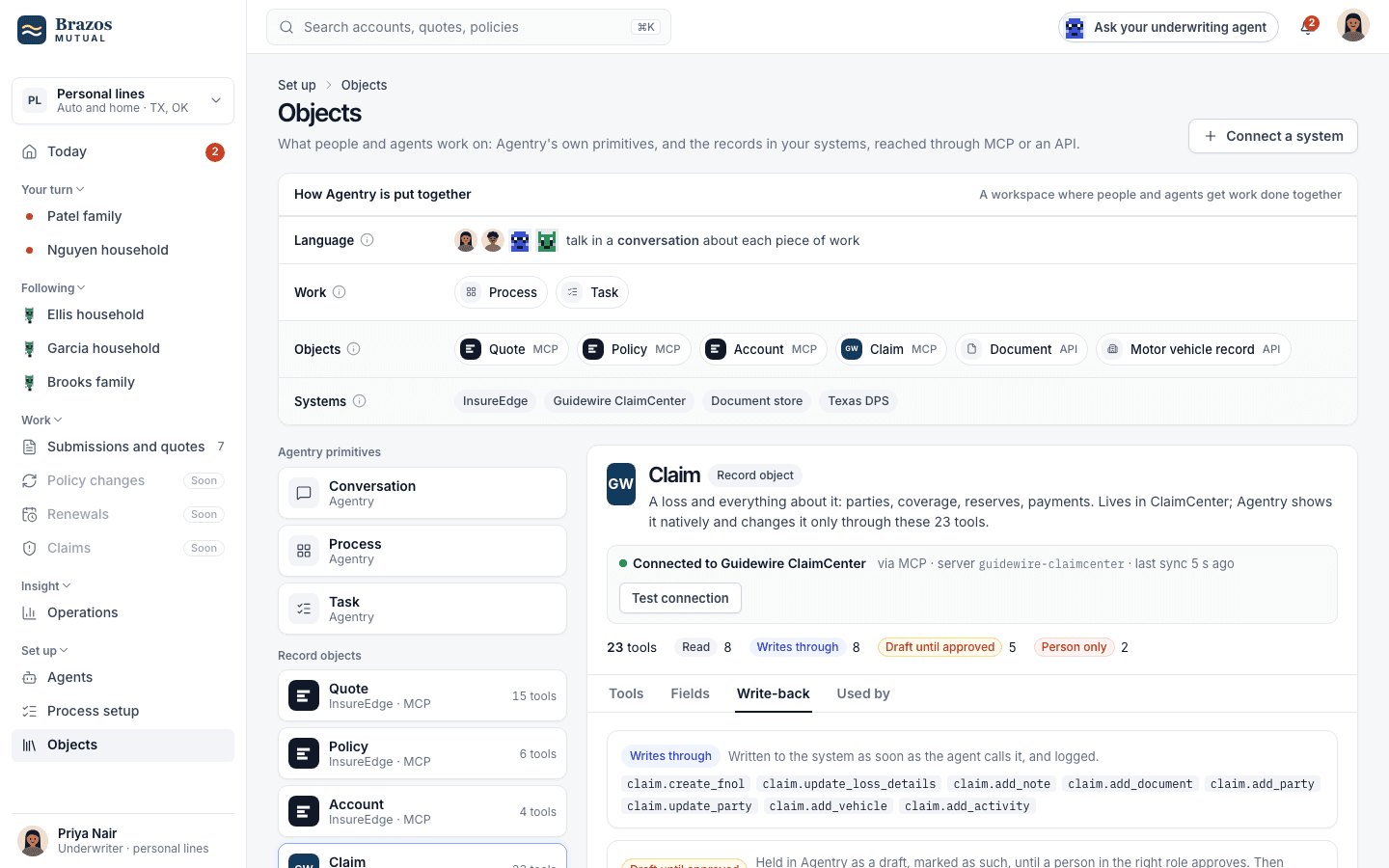
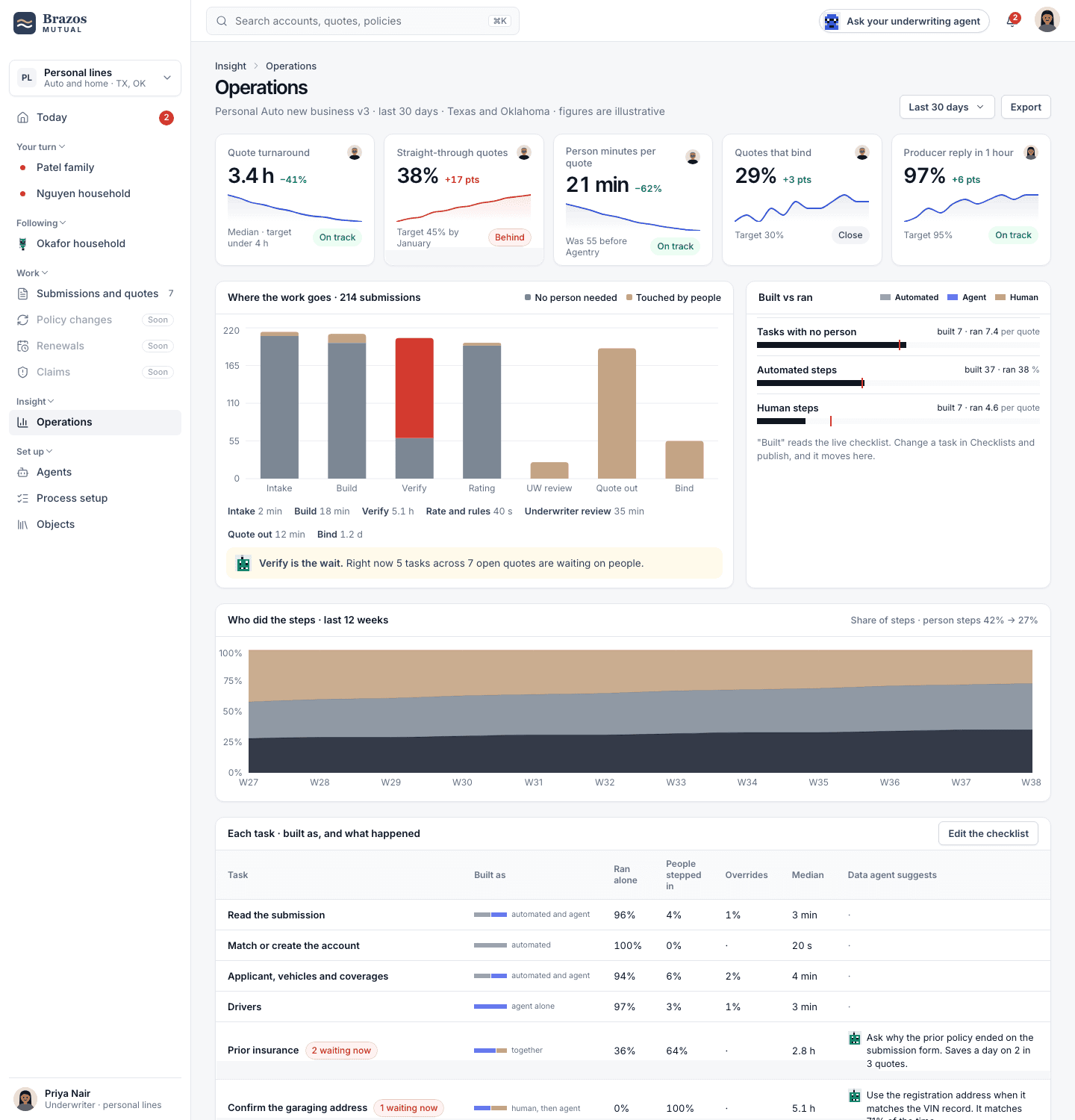
This is what your team will work in every day

Captured from the working prototype.
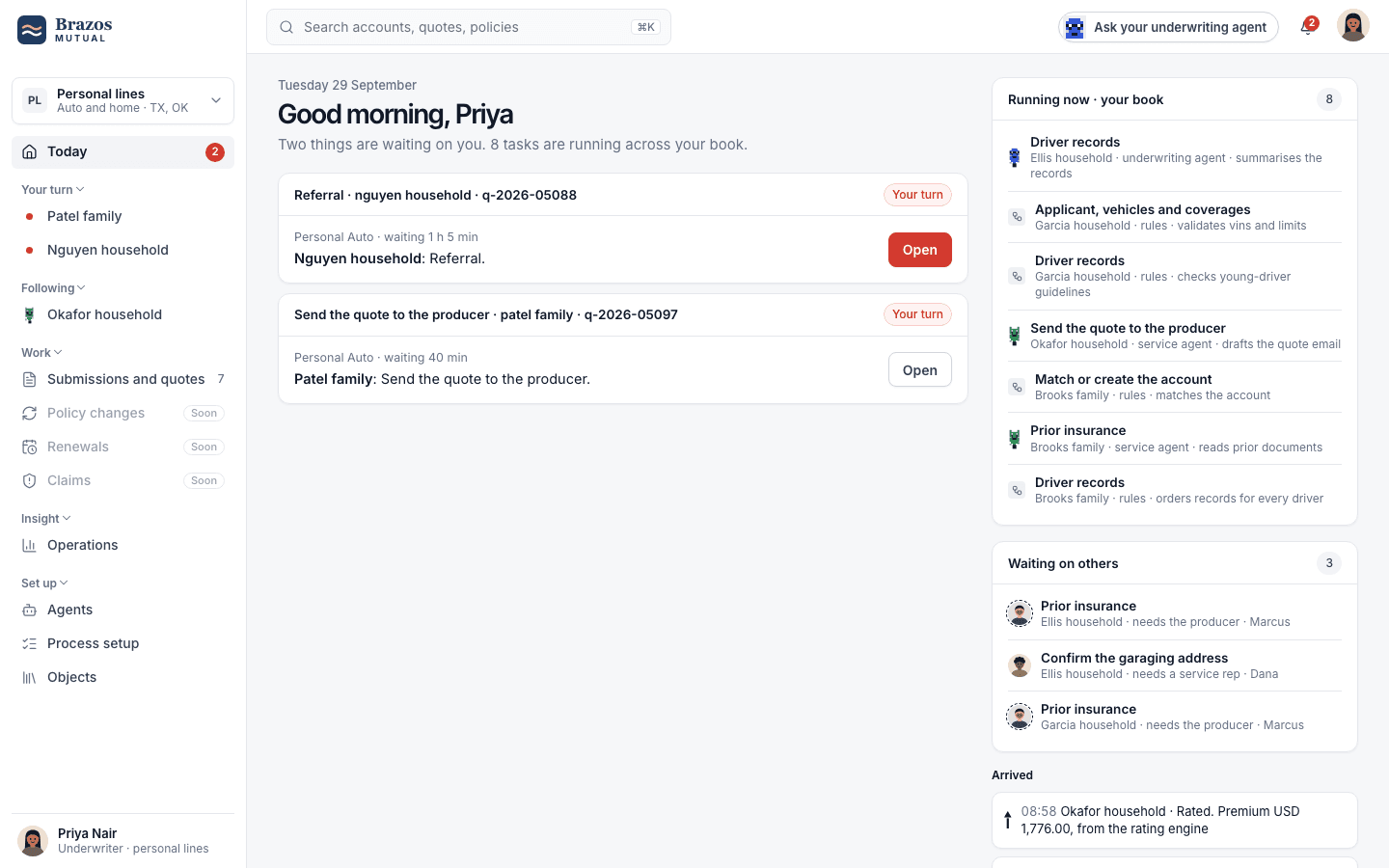
agents.brazosmutual.com/today
What's waiting on each person, and what their agents are doing
TodayWhat's waiting on each person, and what their agents are doing
agents.brazosmutual.com/objects/claim
A claim from Guidewire, and what agents may change in it
ObjectsA claim from Guidewire, and what agents may change in it
agents.brazosmutual.com/operations
Every process held to its numbers
OperationsEvery process held to its numbers

We shape the base platform to your business and its constraints

Workbench ships with a process library. What makes your operation yours is configuration, and Damco shapes it with you.

Processes and stagesStart from the library or your own. Stages, tasks, and hand-offs are yours.
Rules and authorityYour guidelines, versions and owners. Limits by role and by amount.
Objects and fieldsMap each object to the system that owns it. Choose what people see.
Agents and autonomyRole agents, your own, or both. Decide per step how far each goes alone.
ConnectorsYour core, your data providers and the flows you already run.
ConstraintsState rules, delegated authority, data residency, the regulator's clock.

Bring one process and leave with agents doing it

A two-hour working session with your underwriting, claims, or service leads. We map the process, show it running on Workbench and size what it would take.